Download Syncdocs
Thanks for choosing Syncdocs
Syncdocs should start downloading in a few seconds. If it doesn’t, then download manually
The download is size is just over 4MB, and the installation will take about a minute. Here’s how to install it:
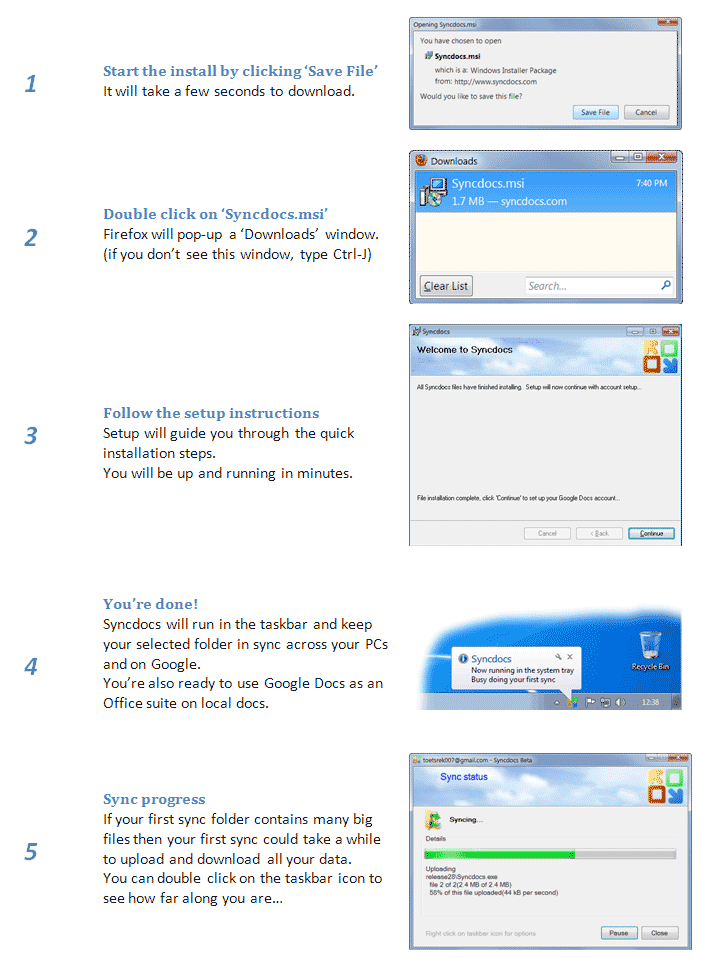
More information
For a step-by-step install walk-though look here. The latest release version number is 7.10
Bonus
The free version of syncs a limited number of files. You can get bonus file sync quota by inviting friends. Purchase Syncdocs for unlimited quota and more features.
Portable (USB stick) Google Drive version and 64 bit version
You can get the version that runs from a USB stick here. It lets you keep your Google Drive synced on a USB memory stick (thumbdrive). Syncdocs also runs from the memory stick.
There is also a 64 bit portable version. This can be faster and can sync more than 1,050,000 files.

Encrypting and Decrypting Google Drive without Syncdocs
You can download the free standalone Google Drive file decryption and encryption utility from here (for .g_encypt_aes files).
Advanced Installation and Automated Deployment
For more advanced install options run: “msiexec /a syncdocs.msi” from a command prompt.
If you wish to do an automatic deployment for your users, look at these scripts. The full automated how to guide shows how to automatically deploy and setup Google Drive sync and backup for your users.
Requirements
The system requirements for Syncdocs.
Syncdocs for Windows XP, 2000 and Server 2003
If you are running Windows 2000, XP SP2 or Server 2003 without .NET 4.5 you will need this version of Syncdocs.
Beta version
The latest beta version of Syncdocs (6.x) with extra features, still in testing is here.
It might might still have a few bugs, though.
